The problem
Your poll workers have signed up. Now they need training that meets the state’s minimum hours (s. 102.014, F.S.) and actually sticks. The Polling Place Procedures Manual has the answers, but it’s organized like a reference book, not a class. Building a 20-plus-slide deck, writing notes so every trainer says the same thing, and coming up with quiz questions takes days you don’t have in the months before an election.
The prompts
Start in a folder
…\AI Projects\Poll Worker Training\
Make the folder
On your C: drive, OneDrive, or an external drive. Your choice.
Open it in the app
Claude: Code tab → under the message box, choose Local → Open folder… ChatGPT: open Codex, click Add new project (or press Ctrl+O), then pick the folder. To add more folders later, open the project menu, choose Edit project, then Add folder.
Say what you want
Use the prompt below. Then open what it saved in the folder.
Say them out loud or type them. Change the words to fit your office. The AI goes and gets the public documents itself and saves what it makes in the folder.
Prompt 1 · Say it or type it
Build the training deck
Go to the Florida Division of Elections website and download the latest Polling Place Procedures Manual. If our county's poll worker manual is in this folder, use it too, and tell me if it isn't. Use them to build a PowerPoint training deck, about 20 to 25 slides, for [Clerks] who have already signed up. Many are first-timers.

Follow the Election Day timeline: getting ready, opening the polls, checking in voters, special situations like provisional ballots and voters who aren't on the roster, and closing. Write speaker notes on every slide so every trainer says the same thing, and put the manual's printed page number at the end of each note. Add a scenario question every few slides.

If our manual and the state manual disagree, point it out instead of picking one. Leave a clearly marked placeholder wherever our equipment steps go; we'll add those from our own materials. Save the deck in this folder, and make the last slide a list of references with links.
Fill in anything in [brackets] with your own details.
One audience per deck. Clerks and inspectors have different jobs and different minimum hours.
Prompt 2 · Say it or type it
Write the quiz
Now write a 15-question knowledge check from the same manuals, mostly short "what would you do" scenarios. Save it as a Word document in this folder, with the answer key and manual pages on a separate last page.
What you need
- The Claude desktop app (Code tab) or the ChatGPT desktop app (Codex) and a folder called something like
Poll Worker Training. Put it wherever you like: the C: drive, OneDrive, or an external drive. - Your county’s poll worker manual, and any procedures your supervisor approved for this election, saved in the folder. The AI gets the state’s Polling Place Procedures Manual (PDF) (Form DS-DE 11, adopted by Rule 1S-2.034, F.A.C.) from the Division of Elections itself. Not every county posts its manual online, so save your own copy here. Without it, the AI can only use the state manual, and there’s nothing to compare.
- Your current training deck, if you have one. Put a copy in the folder and say: “Keep our look and our county’s own slides, update the rest from the manual, and list every change.” You keep the work you’ve already put in, and it may catch an outdated statute reference or a step that changed. See context is king.
- Your equipment steps, from your county’s own approved materials. You add these after; the AI leaves a placeholder.
Step by step
- Make the folder and save your county’s poll worker manual in it.
- Open it in the app. Claude: Code tab → under the message box, choose Local → Open folder…. ChatGPT: open Codex, click Add new project (or press Ctrl+O), and pick the folder. Folder projects walks through it.
- Say the first prompt. Speak it or type it, and name one audience. It downloads the manual into the folder and builds the deck. If it asks before it saves or runs something, read what it’s asking, then say yes.
- Check the edition. Open the manual it downloaded and look at the date on the cover. As of September 2026, the Division’s Forms page lists the 07/2024 edition.
- Open the deck from the folder and check the structure first. Does it follow the day in order, from report time to returning materials? Ask for moves now, before you check details.
- Read every slide and every speaker note. You’ve worked the polls or trained the people who do, so a step out of order or a procedure your precincts don’t follow will stand out. When something looks off, or you aren’t sure, open the manual to the page in the note and read it.
- Settle anything it flagged where the two manuals differ, with your supervisor. Fill in the placeholders (equipment steps and anything local) from your own approved materials.
- Ask for the quiz. Read every question and every answer in the key. A wrong answer is easy to spot when you know the procedure.
- Do a dry run with an experienced inspector or trainer, with a timer. Then run PowerPoint’s accessibility checker (Review → Check Accessibility) and save the final version.
This is how I built our office’s training deck from the public poll worker manual: AI for the first draft and the busywork, people for every procedure.
One possible outcome
From the training deck in the Examples Gallery, built from the 07/2024 state manual for a made-up Sample County. The highlighted [NEED: …] spots are county details the state manual doesn’t have.
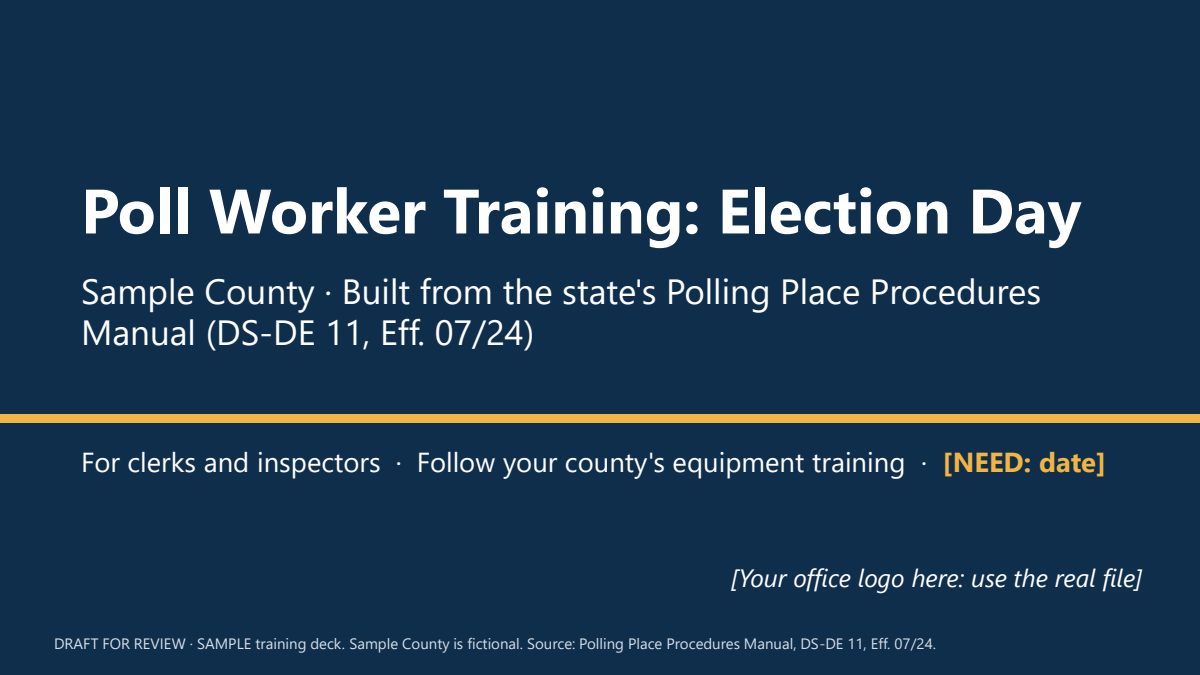 (opens the full version, PDF, 25 slides, 105 KB)
Word, Excel, and PowerPoint files download to your phone; the PDF opens first. File names end in -DRAFT because AI output is a draft until a person checks it. Web addresses shown in these samples are made-up and will not open.
Opening the polls
1- Arrive no later than 6:00 a.m. (p. 7) [NEED: county report time, if earlier]
- Everyone signs the poll worker oath before the polls open (p. 8)
- Compare the ballots with the sample ballot and certify it in writing (p. 8)
- Set up the accessible voting equipment, even if you don't expect to use it (p. 8)
- [NEED: county equipment opening steps]
Speaker note: Walk through the setup list in the same order your team will do it. The polls must be ready to open, and must open, by 7:00 a.m. (p. 7). Stress the accessible equipment: it gets set up and tested every time, whether or not anyone is expected to use it.
Can't find the voter? Search smarter
2- Scan the driver license or state ID first, if your e-poll book can (p. 18)
- Try name variations: hyphens, two last names, accents, Jr./Sr. (p. 18)
- Still not found? Ask if the voter's name or address changed (p. 19)
- No change? Call the Supervisor's office (p. 19)
- Still can't confirm? Offer a provisional ballot (Ch. V, Sec. B)
Speaker note: Most 'not on the list' problems are search problems. Practice with a few made-up names: a hyphenated last name, a name with an accent, a father and son with the same name. Only after every search step, and a call to the office, do we move to a provisional ballot.
7:00 p.m.: closing the polls
3- Announce that the polls are closed and anyone already in line will vote (p. 36)
- Mark the end of the line, for example the deputy stands behind the last voter (p. 36)
- Don't shut down equipment until everyone in line has voted (p. 36)
- [NEED: county equipment close-out and ballot accounting steps]
Speaker note: Anyone in line at 7:00 p.m. votes. That's state law, not a courtesy. If a court or other order ever extends the hours, the manual has special provisional ballot rules on page 36. Call the office before doing anything unusual.
Knowledge check
4- It's 7:00 p.m. and 12 voters are still in line. What happens?
- A. Close the doors. The polls are closed.
- B. Everyone already in line votes. Mark the end of the line.
- C. Everyone still in line votes a provisional ballot.
Speaker note: Answer: B. Manual Ch. IX, Sec. A–B (p. 36) and s. 100.011(1), F.S. Ask someone to explain why C is wrong: the special provisional ballot rule on page 36 only applies if a court or other order extends the hours.
Fictional Sample County example. Page numbers refer to the Polling Place Procedures Manual, DS-DE 11, Eff. 07/24. Check them against the edition you use.
Make it yours
- Refresher for returning workers. Keep the folder. When a new edition of the manual comes out, have the AI compare it with the old one, then build a short “what changed” segment. Check every change it lists against both editions.
Say it or type it
What changed in the new manual?
Go to the Florida Division of Elections website and download the newest Polling Place Procedures Manual. Compare it with the older edition in this folder and list every procedure that changed, was added, or was removed, with the chapter and section. Quote the old and new wording, and explain each change in one plain sentence. Save the list as a Word document in this folder.
- Want it branded? Add “Use our website’s colors and logo” to the first prompt.
- Early voting or primary version. The manual covers early voting too (for example, closing at the early voting closing hour instead of 7 p.m.), and closed primaries have their own check-in rules. An Election Day deck may give those a line or skip them. Tell the AI which one you’re training for.
- Still recruiting? Two poll worker decks from one prompt turns the same manual into decks for people who haven’t signed up yet.
Time: by hand vs. with AI
By hand
6–10 hours
AI’s part, measured
About 10 minutes
in a test run of these prompts
With AI
2–3 hours
your time, including review
About the measured time: “AI’s part” is how long the AI took, start to finish, in a test run of these prompts on September 27, 2026. It works on its own while you do something else. “By hand” and “With AI” are estimates of your own time.
Estimate: the AI downloads the manual and builds the deck and quiz in about 15 minutes. The rest is you checking every procedure against the manual, adding county details, and doing a timed dry run with a trainer. Don’t skip that part. A wrong procedure in a training deck gets repeated at every precinct.
Checking the work: what an expert looks for
You know this work, so you’re the best person to check it. Open every file it made and read every page. If part of it is outside what you know, hand that part to someone who knows it. These are the spots that most often need a fix:
- Open the manual to the page in each speaker note and check the procedure yourself. AI page numbers are often close but wrong. Go by the page itself, not the manual’s index, which is off in places.
- The state manual says its procedures control when a county manual differs. If a slide blends the two, or your county manual is older than the state edition, match the state manual and ask your supervisor about the county one.
- Slide count isn’t training time. Clerks need at least 3 hours and inspectors at least 2 hours before each election (s. 102.014, F.S.). Time a dry run with a real trainer.
- Check the quiz answer key yourself. A wrong answer key teaches the wrong procedure with confidence.
- Equipment steps come from your county’s own approved materials. Keep vendor training manuals and screenshots out of the folder unless your contract and your vendor allow it.
Last reviewed October 2, 2026.