The exact prompt
Older prompt style, kept because it is what produced these files. Today’s style is shorter: say what to do, what to use, and what you want back. See the matching use case for the current prompt.
Say it or type it
Prompt used for this example
I work at the Sample County Supervisor of Elections office in Florida. I've attached two public documents:
1. The state's Polling Place Procedures Manual (Form DS-DE 11, adopted by Rule 1S-2.034, F.A.C.), edition dated Eff. 07/24.
2. Our county's poll worker manual: none for this example. Sample County is fictional, so use only the state manual, plus the Online Sunshine pages for sections 100.011 and 102.014, Florida Statutes.

Build a 20 to 25 slide training deck for people who have ALREADY signed up to work as clerks and inspectors. Many are first-timers. The session is 3 hours.

Organize the slides by the Election Day timeline:
1. Before Election Day (what to bring, when to report)
2. Opening the polls
3. Processing voters (check-in, ID, signature, address changes)
4. Special situations (voter not on the precinct register, provisional ballots, vote-by-mail voters who come to the polls, spoiled ballots, voters who need assistance, upset voters, emergencies)
5. Closing the polls and returning materials
6. Review

For each slide, give me:
- a short title (under 8 words)
- 3 to 5 bullets in plain language (8th-grade reading level)
- speaker notes of 60 to 120 words, written for the trainer to say out loud
- the manual chapter, section, and page each bullet comes from

After every 4 or 5 slides, add a knowledge-check slide with one scenario question, three answer choices, the correct answer, and the page that supports it.

Rules:
- Use only the attached documents. Do not use other states' rules or your general knowledge.
- If the state manual and our county manual seem to disagree, flag it with [CHECK: what differs]. Do not pick one.
- If something our county has to supply is missing (report time, equipment steps, forms, phone numbers), write [NEED: what's missing]. Do not guess.
- Do not write step-by-step voting equipment instructions. Write [NEED: county equipment steps] instead.
- Do not suggest photos of real ballots, voting equipment screens, or real people.
- At the end, list every procedure you used with its chapter, section, and page.
Fill in anything in [brackets] with your own details.
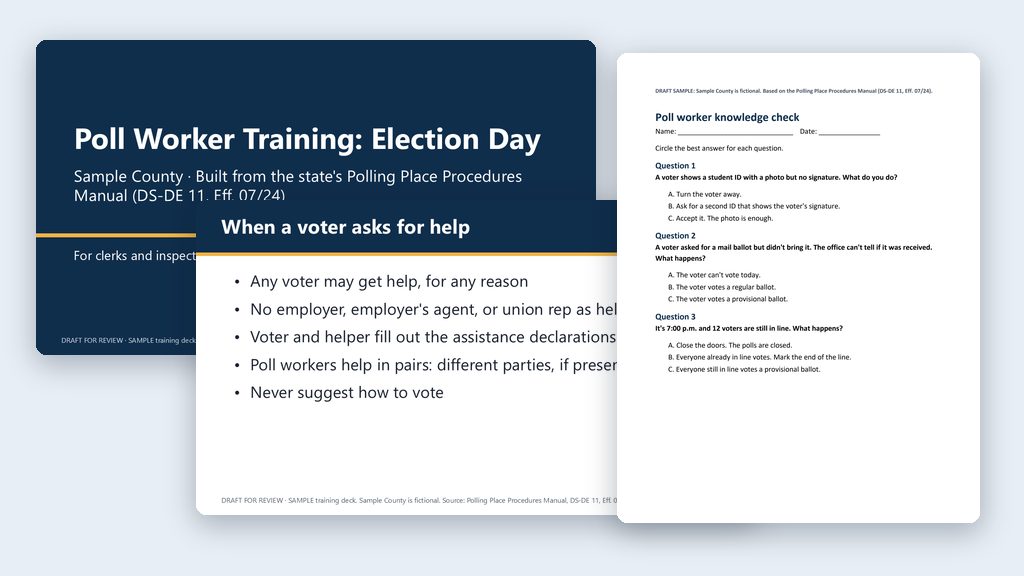
The deck and quiz from one run of the prompt above, for a made-up Sample County, built from the July 2024 state manual. Spots only your county knows are marked [NEED: …].
Every slide, at a glance
Poll Worker Training: Election Day
1- For clerks and inspectors
- Follow your county's equipment training
- [NEED: date]
Part 1: Opening the polls
2- Before 7:00 a.m.: arrive, set up, and get ready
Arrive and get ready
3- Arrive by 6:00 a.m. [NEED: Sample County report time]
- Polls must be ready and open by 7:00 a.m.
- Check that every poll worker signed the oath
- Compare ballots with the sample ballot; certify it in writing
- Set up equipment: follow your county's equipment training
Set up for every voter
4- Set up the accessible voting equipment, even if no one is expected to use it
- Place booths so voters can't see each other's ballots
- Keep paths and doorways clear; check the lighting
- Post required signs in English and Spanish
- Mark the 150-foot no-solicitation zone
While the polls are open
5- Stay nonpartisan: no campaign buttons, shirts, or hats
- Don't discuss candidates, parties, or issues
- Stay off personal phones; focus on voters
- Candidates and media may come in only to vote
- No photos, except voters photographing their own ballot
Part 2: Checking in voters
6- Precinct register, photo ID, signature, and address
Photo ID and signature
7- Voter shows a current, valid photo ID with a signature
- No signature on it? Ask for a second ID that has one
- No photocopies or electronic images of an ID
- Compare the photo, then compare the signatures
- Signatures differ? Voter completes a signature affidavit
Can't find the voter?
8- Scan the driver license or state ID first, if your e-poll book can
- Try name variations: hyphens, two last names, accents, Jr. or Sr.
- Ask whether the voter's name or address changed
- No change? Call the Supervisor's office
- Still can't confirm? Offer a provisional ballot
Address and name changes
9- Ask every voter about address changes
- Moved within the county? Fill out an address change affirmation
- New precinct on Election Day? Direct the voter to the right polling place
- Name changed? Affirmation or registration form first
- Address protected? Use your Supervisor's private process
Knowledge check 1
10- A voter shows a student ID (ends 2027) with a photo but no signature. What do you do?
- A. Turn the voter away.
- B. Ask for a second ID that shows the voter's signature.
- C. Accept it. The photo is enough.
Part 3: Special situations and voters who need help
11- Provisional ballots, mail ballots, spoiled ballots, and assistance
Provisional ballots: when
12- No acceptable photo ID with a signature
- Can't find or confirm the voter's registration
- Voter was challenged, or the register flags possible ineligibility
- Can't confirm whether a mail ballot was received
- You can't reach the Supervisor's office
Provisional ballots: the steps
13- Voter completes and signs the certificate in front of you
- You sign it too: election date, precinct or ballot style, reason
- Voter seals it: secrecy envelope inside the provisional envelope
- Give the voter the written Notice of Rights
- Never tabulate a provisional ballot at the polls
Mail ballot voters at the polls
14- Brought the mail ballot? Cancel it, then the voter votes
- Didn't bring it? Call the office to check if it was received
- Office hasn't received it: the voter votes a regular ballot
- Received, or can't confirm: provisional ballot
- A mail ballot never goes into the voting booth
Spoiled and abandoned ballots
15- Mistake? If the ballot isn't cast yet, the voter gets a new one
- Up to 3 attempts, including the first
- Spoil it: notch, cut, or tear through the timing marks
- Ballot left behind? Put it in an "unscanned ballot" envelope
- Never tabulate an abandoned ballot at the polls
When a voter asks for help
16- Any voter may get help, for any reason
- No employer, employer's agent, or union rep as helper
- Voter and helper fill out the assistance declarations
- Poll workers help in pairs: different parties, if present
- Never suggest how to vote
Voters with disabilities
17- Speak directly to the voter, even with a companion or interpreter
- Ask before touching a wheelchair, cane, or walker
- Don't pet or distract a service animal
- Offer the accessible voting equipment
- Use people-first language: "a person who uses a wheelchair"
Upset voters and emergencies
18- Stay calm and keep your voice down
- Listen, and try to find a solution
- Voter very angry or threatening? Get the clerk or deputy
- Emergency: call 911, then the Supervisor's office
- Write down what happened and how it was resolved
Knowledge check 2
19- A voter asked for a mail ballot but didn't bring it. The office can't tell if it was received. What happens?
- A. The voter can't vote today.
- B. The voter votes a regular ballot.
- C. The voter votes a provisional ballot.
Part 4: Closing the polls
20- 7:00 p.m. until everything is back at the office
7:00 p.m.: closing the polls
21- Announce that the polls are closed and anyone in line will vote
- Mark the end of the line, such as the deputy behind the last voter
- Don't shut down equipment until everyone in line has voted
- Secure the equipment: follow your county's equipment training
Account for every ballot
22- Match every ballot to the number the office issued
- Match voters signed in to ballots cast plus provisional ballots
- Check emergency and auxiliary bins for voted ballots
- Numbers don't match? Recount, then report it in writing
- No more than 3 people near the officials while reconciling
Return everything
23- Post the results at the polls as each count is finished
- Clerk and inspectors sign the certificate of results
- Seal ballots, stubs (ends 2027), and papers for the Supervisor's office
- Provisional ballots stay sealed and go back to the office
- Registration books and poll lists: not in the ballot boxes
Knowledge check 3
24- It's 7:00 p.m. and 12 voters are still in line. What happens?
- A. Close the doors. The polls are closed.
- B. Everyone already in line votes. Mark the end of the line.
- C. Everyone still in line votes a provisional ballot.
SAMPLE training deck. Sample County is fictional. Source: Polling Place Procedures Manual, DS-DE 11, Eff. 07/24.
Want this for your county? Here’s how to do it yourself
- Read the training deck use case, especially the note about the 2026 law changes that take effect in 2027.
- Make a folder, such as
Poll Worker Training, on your C: drive, OneDrive, or an external drive, and put your county’s poll worker manual and approved procedures in it. Open the folder in the Claude desktop app (Code tab, then under the message box choose Local and Open folder…) or the ChatGPT desktop app (open Codex, click Add new project or press Ctrl+O, then pick the folder). To add more folders later, open the project menu, choose Edit project, then Add folder. See Folder projects. - Say what you want, the way the use case’s prompts do: have the AI download the current manual from the Division of Elections Forms page into the folder, then build the deck, the quiz, and the PowerPoint file there from both manuals, for your positions and session length. Check the date on the manual’s cover.
- Read every slide and every speaker note. You’ve worked the polls or trained the people who do, so a step out of order or a procedure your precincts don’t follow will stand out. When something looks off, or you aren’t sure, open the manual to the cited page and read it.
- Settle anything the two manuals disagree on with your supervisor, and fill in everything only your county knows (any
[NEED]or[CHECK]spots included). Equipment steps come from your county’s own approved materials. - Do a timed dry run with an experienced trainer. The deck doesn’t replace the statewide curriculum, the minimum training hours (s. 102.014(4), F.S.), or the separate disability etiquette and sensitivity training (s. 102.014(7), F.S.).
- Run PowerPoint’s accessibility checker (Review, then Check Accessibility), and get your supervisor’s approval before you train.