The problem
Every public meeting needs minutes, and someone has to write them. A one-hour canvassing board meeting can mean two or three hours with the recording, rewinding to catch who made the motion and how the vote went. Minutes are usually needed before the next meeting, and in election season the next meeting can be tomorrow.
The prompts
Start in a folder
…\AI Projects\Canvassing Board Minutes\
Make the folder
On your C: drive, OneDrive, or an external drive. Your choice.
Open it in the app
Claude: Code tab → under the message box, choose Local → Open folder… ChatGPT: open Codex, click Add new project (or press Ctrl+O), then pick the folder. To add more folders later, open the project menu, choose Edit project, then Add folder.
Say what you want
Use the prompt below. Then open what it saved in the folder.
Say them out loud or type them. Change the words to fit your office. The AI goes and gets the public documents itself and saves what it makes in the folder.
Prompt 1 · Say it or type it
Draft the minutes
The transcript and agenda for our [Meeting name and date] are in this folder, along with approved minutes from a past meeting of the same board. Draft minutes for this meeting in the same format as the past minutes, and save them as a Word document in this folder.

Minutes record actions, not opinions. For every motion, give who made it, who seconded it, its exact wording, and the vote. If the transcript doesn't show a count or an "opposed" call, say so instead of writing "unanimously." Put the transcript timestamp in brackets at the end of each item, so I can find it in the recording and delete it before approval.
Fill in anything in [brackets] with your own details.
Speak it or type it. Take any voter names or details out of the transcript before you start.
Prompt 2 · Say it or type it
Fix what you checked
I listened at 00:21:10. The board adopted a 10 a.m. start time, not 9. Fix that in the minutes.
Use your own timestamp and what you heard.
Prompt 3 · Say it or type it
Pull out the action items
Make a separate list of every follow-up someone agreed to: what, who by title, any deadline, and the timestamp. Save it in this folder.
What you need
- The Claude desktop app (Code tab) or the ChatGPT desktop app (Codex) and a folder called something like
Canvassing Board Minutes. - Three files in the folder: the transcript with timestamps, the agenda, and approved minutes from a past meeting of the same board. If the meeting was recorded in Microsoft Teams, Teams can produce the transcript. Otherwise, use the transcription tool your office has approved and export the text with timestamps. If a court reporter covers your board’s meetings, the court reporter’s transcript is usually a better starting point than an automatic one.
Step by step
- Make the folder and save the transcript, agenda, and past minutes in it.
- Skim the transcript for personal information. If voters’ names, addresses, or other details were read aloud, replace them with “[voter]” before you go further.
- Open the folder in the app. Claude: Code tab, then under the message box choose Local and Open folder…. ChatGPT: open Codex, click Add new project (or press Ctrl+O), and pick the folder. (Full walkthrough: Folder projects.)
- Say the prompt. Open the minutes it saved in the folder.
- Read every motion, second, and vote. If you were at the meeting or work with this board, a wrong vote or a motion credited to the wrong member will stand out. Jump to the timestamp in the recording to confirm. This is the most important step.
- Tell the AI what you heard wherever the draft is wrong. It fixes the draft in place.
- Route the draft for approval the way you always do.
- File the recording, transcript, and approved minutes under your retention schedule.
One possible outcome
One run of the first prompt, with a transcript, agenda, and past minutes for the Sample County Canvassing Board. All names are made up.
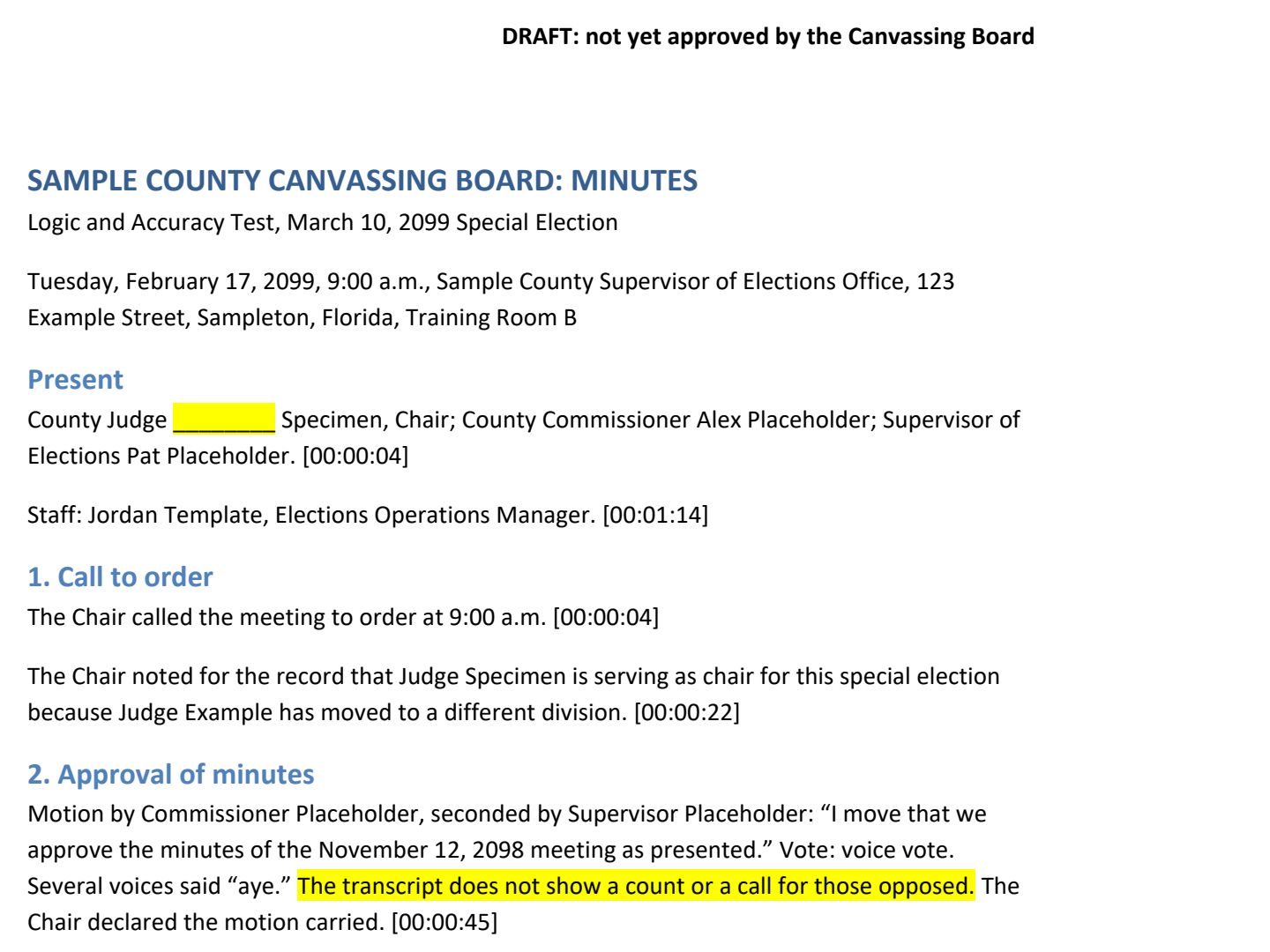 (opens the full version, PDF, 2 pages, 210 KB)
Word, Excel, and PowerPoint files download to your phone; the PDF opens first. File names end in -DRAFT because AI output is a draft until a person checks it. Web addresses shown in these samples are made-up and will not open.
Make it yours
- Your minutes paraphrase motions? Many boards’ action minutes do. Ask for that instead of “exact wording.”
- Before the meeting. Canvassing board meeting notices covers the notice side.
Time: by hand vs. with AI
By hand
2–3 hours
AI’s part, measured
About 25 minutes
in a test run of these prompts
With AI
45 minutes
your time, including review
About the measured time: “AI’s part” is how long the AI took, start to finish, in a test run of these prompts on September 27, 2026. It works on its own while you do something else. “By hand” and “With AI” are estimates of your own time.
Estimate for a one-hour meeting with a transcript: about 15 minutes for the AI draft, then about 40 minutes for staff to check every motion, second, and vote against the recording. That check is the part you can’t skip.
Checking the work: what an expert looks for
You know this work, so you’re the best person to check it. Open every file it made and read every page. If part of it is outside what you know, hand that part to someone who knows it. These are the spots that most often need a fix:
- Check every motion, second, and vote against the recording. This is where AI summaries go wrong most often, and it’s the part of the minutes that matters most.
- Speaker labels in automatic transcripts are often wrong or missing, most of all on one-word lines like “Second.” Transcription tools also mishear numbers. Listen for every second, and double-check counts, precinct numbers, and times.
- An AI draft is not the official minutes. Minutes become official the same way they always have: staff review them and the board approves them.
- Meetings that review individual ballots or signatures can include voters’ names and details. Take them out of the transcript before it goes in the folder, or use only an approved business-tier tool.
- Keep the recording at least until the minutes are approved, then follow your retention schedule (the state’s list of how long to keep each kind of record). Ask your records management liaison officer (RMLO) which items cover recordings and minutes.
Last reviewed October 2, 2026.